
How to Block AI Crawlers in WordPress (GPTBot, Claude)
Want to stop ChatGPT, Gemini or Claude from training on your content? Here's how AI crawlers really work, what robots.txt can and can't do, and how to block them in WordPress.

“Can I stop ChatGPT from training on my articles?” is one of the most common questions I get now, and it deserves a straight answer instead of a scare or a sales pitch. The honest version has two halves: yes, you can tell the major AI crawlers to stay out—and no, a text file can’t physically stop a bot that’s decided to lie. Let me show you exactly what’s in your control, what isn’t, and how to set your policy in WordPress in about a minute.
The essentials
- The big AI crawlers each use a distinct user-agent—GPTBot, Google-Extended, ClaudeBot, PerplexityBot, CCBot—and publicly commit to obeying robots.txt.
- Google-Extended is separate from Googlebot: blocking it stops Gemini and AI Overviews from using your content without touching your normal search rankings.
- robots.txt is a request, not a wall—Bytespider and some stealth crawlers have been caught ignoring it, so it’s a signal to honest bots, not enforcement.
- Blaminhor Essentials offers two layers: robots.txt blocking (stops the fetch) and
noai/noimageaimeta tags (asks engines not to train on what they did fetch). Use either or both. - Every toggle has a WP-CLI mirror (
wp blaminhor seo set --ai-block-chatgpt=true), and all controls are off by default—you opt in deliberately.
What are AI crawlers, and which ones matter?
AI crawlers are automated bots that fetch web pages to train language models or to answer questions in AI products—each identifying itself with a named user-agent so you can allow or block it selectively. They’re not one faceless swarm; they’re a handful of named agents from specific companies, and knowing the names is the whole game.
Here are the five that matter most in 2026, and what each one feeds:
| Crawler | Company | What it feeds | Obeys robots.txt? |
|---|---|---|---|
| GPTBot | OpenAI | ChatGPT and model training | Yes |
| Google-Extended | Gemini and AI Overviews (not classic Search) | Yes | |
| ClaudeBot | Anthropic | Claude models | Yes |
| PerplexityBot | Perplexity | Answer-engine citations | Yes |
| CCBot | Common Crawl | An open dataset many AI firms train on | Yes |
That last one is worth a beat: CCBot belongs to Common Crawl, a nonprofit whose public dataset is used to train a huge range of models. Block CCBot and you cut off an indirect training pipeline you’d otherwise never see in your logs.
Does blocking in robots.txt actually stop them?
For the named, well-behaved bots—yes; for a bot that’s decided to ignore the rules—no, and anyone who tells you otherwise is overselling. robots.txt is a politeness protocol. It works because reputable companies choose to honor it and publish their user-agent names so you can. GPTBot, ClaudeBot, PerplexityBot, Google-Extended and CCBot all fall in that camp.
But the protocol has no teeth. Bytespider (ByteDance) and some stealth crawlers have been documented fetching pages they were told not to. So the honest mental model is a “please keep out” sign, not a locked gate. It stops the honest majority cold and does nothing to a determined bad actor—for those, the defense lives at the server or firewall layer, not in a text file.
Won’t blocking Google hurt my search rankings?
No—and this is the misunderstanding that stops people from acting. Google runs two separate crawlers for two separate jobs. Googlebot indexes your site for classic Search. Google-Extended is a distinct token that governs only whether your content trains Gemini and appears in AI Overviews.
Blocking Google-Extended tells Google “don’t use my content for AI” while Googlebot keeps crawling and ranking you exactly as before. You lose nothing in the blue links. That clean separation is precisely why blocking AI training is a low-risk decision for most site owners—you’re not choosing between Google and privacy, you’re declining one specific use.
How do you block AI crawlers in WordPress?
In WordPress you don’t edit robots.txt by hand—you tick the crawlers you want out, and the SEO module appends the right rules to your virtual robots.txt. With Blaminhor Essentials, here’s the flow:
- Open the SEO module’s GEO / AEO tab. It groups every AI control in one place, alongside llms.txt (structured data lives in its own Schema tab).
- Under “Block via robots.txt,” tick the crawlers you want to refuse—GPTBot, Google-Extended, ClaudeBot, PerplexityBot, CCBot. Each is an independent checkbox, so you can block training bots while allowing citation-friendly ones.
- Optionally enable the
noaimeta tags. This addsnoaiandnoimageaito your pages, asking engines not to use content they did fetch for training—a second layer behind the block. - Save. The module writes a clearly labeled block into your robots.txt (
User-agent: GPTBot/Disallow: /, one per chosen bot). Visityoursite.com/robots.txtto see it.
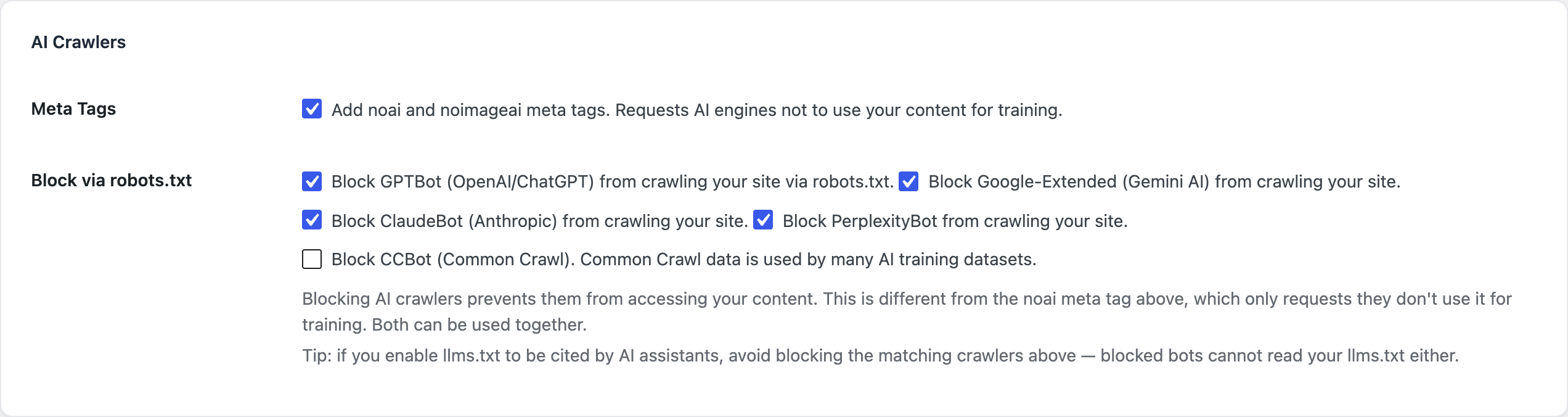 One checkbox per crawler. Block training bots, allow citation engines, or refuse them all—your call, per bot.
Prefer the command line? Every toggle has a WP-CLI twin, so you can set policy across a fleet of sites in one script:
wp blaminhor seo set --ai-block-chatgpt=true --ai-block-claude=true --ai-block-common-crawl=trueThe same validation runs whether you click or type—the CLI isn’t a second-class citizen bolted on afterward.
Block them or invite them—how do you decide?
Decide per engine, based on whether you’d rather protect your content or be cited by AI. There’s no universally correct answer, and it’s rarely all-or-nothing.
Block them if your writing is your product—a paid publication, original research, a portfolio you don’t want reworded into an answer with no click back. Allow them if discovery matters more than protection and you’d happily trade a crawl for a citation in ChatGPT or Perplexity. Many sites split the difference: block the pure training bots like CCBot, allow the ones that send referral traffic.
The bottom line
You have real, easy control over the honest majority of AI crawlers, and blocking them costs you nothing in normal search. What you don’t have is a magic wall against bots that ignore the rules—for those, the fight moves to your server. Set your robots.txt policy deliberately, add the noai tags as a backstop if you like, and revisit it as new crawlers appear.
Then make it consistent with the other half of the AI-SEO question: if you want to be cited, pair an open policy with a clean llms.txt map of your content. AI-crawler control is one of the 20+ tools in Blaminhor Essentials—free and open-source on WordPress.org.
FAQ
Does blocking a crawler in robots.txt actually stop it?
For the named, well-behaved bots—GPTBot, ClaudeBot, PerplexityBot, Google-Extended, CCBot—yes: they publicly commit to obeying robots.txt. But robots.txt is a request, not a wall. Bots like Bytespider and some stealth crawlers have been documented ignoring it, so treat it as a clear signal to honest bots, not enforcement against dishonest ones.
Will blocking Google-Extended hurt my normal Google rankings?
No. Google-Extended controls only whether your content feeds Gemini and Google's AI Overviews. It's separate from Googlebot, which handles classic Search indexing. Blocking Google-Extended keeps you out of AI training and AI answers while leaving your ordinary search rankings completely untouched.
What's the difference between the noai meta tag and robots.txt blocking?
The noai and noimageai meta tags ask AI engines not to use content they've already fetched for training—a polite request applied per page. robots.txt blocking stops the crawler from fetching the page at all. They work at different stages, so you can use both: block the bot, and tag the pages as a backstop.
Should I block AI crawlers or not?
It depends on your goal. Block them if your content is your product and you don't want it training models or answered without a click. Allow them if you want to be cited in AI answers and grow that way. It's rarely all-or-nothing—many sites block training bots like CCBot while allowing citation-friendly ones.
Can I block AI bots from the command line?
Yes. In Blaminhor Essentials each toggle has a WP-CLI mirror—for example `wp blaminhor seo set --ai-block-chatgpt=true`—so you can script the policy across many sites or bake it into a deployment. The same validation runs whether you click the box or run the command.
Does blocking AI crawlers slow down or break my site?
No. The block is just a few lines appended to your virtual robots.txt; it adds no runtime cost and touches nothing a human visitor sees. It only changes what automated AI bots are told when they check your robots.txt before crawling.
Comments